


Cressi Michelangelo Diving Computer
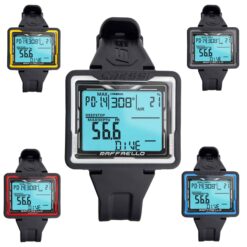
The Cressi Michelangelo dive computer offers Air, two-gas Nitrox, Gauge and Free modes, a large backlit display and one-button controls. A stainless-steel bezel, replaceable screen cover and user-replaceable battery make it practical for regular diving. Optional Bluetooth dive-log interface sold separately.
Cressi ATELIER products are sold offline only. Please call us to purchase.
Colour options
- Black
- Black / Dark Metallic
Contact us for colour availability.
- Description
- Technical Specs
- Additional information
- Product Manual
- Shipping
- Returns & Exchanges
- Click & Collect
- Frequently Asked Questions
- Reviews (0)
Cressi Michelangelo Diving Computer
The Cressi Michelangelo dive computer combines a large backlit display with one-button controls, making dive information easy to check on your wrist. Air, Nitrox, Gauge and Free modes support scuba diving and breath-hold use.
It supports two Nitrox mixtures and features a stainless-steel bezel, replaceable screen cover and user-replaceable battery. An optional Bluetooth interface, sold separately, transfers dive logs to the Cressi app.
A large display that is easy to check underwater
Extra-large digits, a high-contrast screen and a backlight help you check dive information at a glance. The large front button lets you scroll through menus and hold to select a setting. A stainless-steel bezel adds impact protection, while the replaceable protective screen cover helps protect the display. The TPU wrist strap has a stainless-steel buckle.
Air and two-gas Nitrox diving
This Cressi dive computer uses the Cressi RGBM decompression algorithm. Choose from three safety-factor settings, configure altitude and select the optional deep-stop function to match your dive planning and training.
In Nitrox mode, Gas 1 can be set from 21–50% oxygen and Gas 2 from 21–99%, with switching between the two configured mixtures during a dive. The oxygen partial-pressure limit is adjustable from 1.2–1.6 bar. A graphical CNS oxygen-exposure indicator and audible and visual alerts help you monitor the dive. Always analyse your gases and check the computer settings before entering the water.
Freediving and Gauge modes
- Free / Apnea: displays depth, dive time, temperature and the surface interval between descents, with configurable depth, dive-time and recovery-time alarms.
- Gauge: displays depth, average depth, temperature and elapsed dive time, with a resettable underwater stopwatch. This mode does not calculate decompression.
Plan dives and review your logbook
The dive planner lets you review no-decompression limits. After scuba dives, the computer displays surface interval, desaturation and no-fly information. Choose metric or imperial units, and use the onboard logbook to review up to 50 dives per program type.
To download dive profiles, add the compatible Cressi Bluetooth interface KS851000, sold separately. The interface transfers recorded dives to compatible Cressi software or the app; the computer does not connect directly by Bluetooth without it.
Care, washing and battery replacement
Rinse the closed computer in fresh water after each use, dry it thoroughly and store it dry, away from heat and heavy gear. Avoid solvents, chemical cleaners, oils and sprays, and do not use compressed air to dry it. Inspect the strap, buckle and screen cover regularly.
The Michelangelo uses a user-replaceable CR2450 3 V battery. Follow Cressi’s battery-replacement and sealing instructions, and use the correct compatible Cressi battery kit. If moisture or corrosion is present inside the battery compartment, have an authorised Cressi service centre inspect it before further use.
Colour options
- Black: KS850050 — EAN 8022983139487
- Black / Dark Metallic: KS850850 — EAN 8022983177748
This Cressi Atelier product is not available to purchase online. Please contact Dive Gear Australia for pricing, colour availability and purchasing.
Technical Specs
| Brand | Cressi |
|---|---|
| Main model / configuration | Cressi Michelangelo wrist dive computer |
| Product type | Scuba and freediving computer |
| Dive modes | Air; Nitrox; Gauge; Free / Apnea |
| Depth rating | 150 m water-resistance rating |
| Freediving mode | Yes; depth, dive time and surface-interval tracking |
| Nitrox / oxygen compatibility | Yes |
| Gas capacity | 2 |
| Battery | CR2450, 3 V |
| Buttons | 1 large front button |
| Computer style | Wrist |
| Colour family | Black; Grey |
| Decompression / dive algorithm | Cressi RGBM |
| Oxygen partial-pressure setting | 1.2–1.6 bar |
| Altitude adjustment | User configurable |
| Alarms | Audible and visual; ascent rate, decompression and oxygen alerts; configurable depth and freediving alarms |
| Dive planner | No-decompression-limit planning |
| No-fly time | Displayed with desaturation and surface-interval information |
| Fresh / salt water | Depth sensor calibrated for salt water |
| Deep stop | Optional; can be enabled or disabled |
| Bluetooth | Via optional Cressi KS851000 interface; sold separately |
| Rechargeable | No; replaceable battery |
| Dive log capacity | Up to 50 dives per program type |
| Lens / screen glass | Replaceable protective display cover |
| Oxygen setting range | Gas 1: 21–50% O₂; Gas 2: 21–99% O₂ |
| Colours / options | Black; Black / Dark Metallic |
| Display technology | High-contrast display with extra-large digits and backlight |
| Gas switching | Switch between two configured mixtures during a Nitrox dive |
| Bezel material | Stainless steel |
| Depth and temperature display | Depth and temperature display |
| Ascent-rate indicator | Indicator with alerts |
| User-replaceable battery | Yes; follow Cressi battery and sealing instructions |
| Strap material | TPU wrist strap; stainless-steel buckle |
Additional specifications
| Black model / EAN | KS850050 / 8022983139487 |
|---|---|
| Black / Dark Metallic model / EAN | KS850850 / 8022983177748 |
| Gauge mode | Depth, average depth, temperature and elapsed time; resettable stopwatch; no decompression calculations |
| Time and units | 12/24-hour clock with calendar; metric or imperial units |
The water-resistance rating is a hardware specification; dive within your training and the manual's operating limits.
Based on Cressi product information.
| Colour | Black, Black / Dark Metallic |
|---|---|
| Cressi codes and EAN barcodes | Black: KS850050 / 8022983139487, Black / Dark Metallic: KS850850 / 8022983177748 |
| Operating modes | Air, Nitrox, Gauge, Free |
Official manufacturer instructions for this product.
Cressi Michelangelo-Donatello User Manual
Read the manual before use. For firmware updates, follow the manufacturer support link. Our team can help during business hours.
In-stock orders placed before 12 noon Melbourne time on weekdays are usually dispatched the same day once payment is confirmed. This excludes public holidays, pre-orders, backorders, special orders and custom orders. Dispatch times can vary. Delivery time depends on the carrier and your location.
Standard mainland Australian shipping is $20. Click & Collect from our Hallam store is free once your order is ready.
- Large or bulky gear: additional freight charges apply on top of standard shipping: large dive bags $30; long freediving fins $15; long spearguns $20. Scuba tank freight is shown at checkout.
- Rural, remote & offshore: rural means anywhere outside metropolitan areas. Carrier availability and additional charges may apply, including for island and territory destinations. Our team will contact you if an extra freight quote is needed.
The available delivery rate for your order is shown at checkout.
Need your gear urgently? You are welcome to arrange your own same-day courier or Uber pickup from Hallam. Call 03 9702 3694 before booking so we can confirm payment, that your order is packed and ready, and a collection time. Tell us who will collect and give your driver the order number. You arrange and pay the courier directly; delivery timing depends on the provider.
Contact us within 30 days of delivery to request a refund, exchange or optional store credit on eligible unused goods within Australia. Refunds go to the original payment method. Keep goods clean and undamaged with tags, original packaging and all accessories. No restocking fee applies to eligible returns meeting these conditions.
For change-of-mind returns and size exchanges, you pay return postage and replacement shipping. Original delivery charges are not refunded. Water-tested goods, clearly marked clearance items and genuinely custom-made or personalised items are excluded from change-of-mind returns. Ordinary discounted goods remain eligible.
For product problems, please call 03 9702 3694 before returning an item so we can help and explain the next steps.
Still unsure which size to choose?
Call our experienced dive instructors on 03 9702 3694 before ordering. Have your measurements and preferred product ready so we can help you choose the most suitable size. Fit varies between brands and models.
FREE CLICK & COLLECT
Usually ready same day*
Select local pickup at checkout. We will email you when your order is ready. Please wait for your ready-to-collect confirmation before visiting, then bring your confirmation email and photo ID.
Need your gear urgently? You can arrange your own same-day courier or Uber pickup. Call 03 9702 3694 before booking so we can confirm payment, that your order is packed and ready, and a collection time. Tell us who will collect and give your driver the order number. You arrange and pay the courier directly; delivery timing depends on the provider.
Collect from our Hallam store
Factory 4 / 56–60 Hallam South Rd
Hallam VIC 3803
*For items in stock at our Hallam store during opening hours, subject to order processing. Available-to-order and special-order items take longer. Collection is unavailable while the store is closed.
Can I collect my order from the store?
Yes. Choose free local pickup at checkout and wait for your ready-to-collect email before visiting our Hallam store. Bring your confirmation and photo ID. See Click & Collect details.
How do I choose the right size?
Use the product's size chart where available and compare your measurements with the guide for that brand. Sizing varies between brands and products. Still unsure? Call our experienced dive instructors on 03 9702 3694 during business hours before ordering. Have your measurements and preferred product ready. For fins and boots, tell us which socks or dive boots you will wear.
How do I check availability?
Select your required options, such as colour and size, to see availability for that variation. “Available to order” means the item may need to be sourced before dispatch. Call 03 9702 3694 to check the current lead time before ordering, especially if you need your gear for a trip or a particular date.
When will my order be dispatched?
In-stock orders placed before 12 noon Melbourne time on weekdays are usually dispatched the same day once payment is confirmed. This excludes public holidays, pre-orders, backorders, special orders and custom orders. Dispatch times can vary. Delivery time is separate from dispatch time and depends on your location and the carrier. Read our shipping information.
Can I exchange an item if it does not fit?
Contact us within 30 days of delivery to request a refund to the original payment method, exchange or optional store credit on eligible unused goods. You pay change-of-mind return postage and replacement shipping; original delivery charges are not refunded. No restocking fee applies to eligible returns. Clearance and genuinely custom-made items are excluded from change-of-mind returns. Read the return conditions and next steps.
Can you help me choose the right gear?
Yes. Call 03 9702 3694 during store hours or email [email protected]. Tell us which product you are considering and how you plan to use it.
Only logged in customers who have purchased this product may leave a review.
Similar products
View all Cressi Dive Computers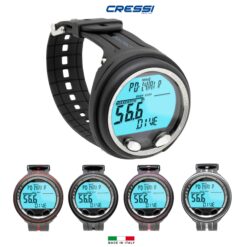



Reviews
There are no reviews yet.